Multimodal and Agentic Workflows with Gemma 4 in KerasHub
Author: Sachin Prasad
Date created: 2026/04/14
Last modified: 2026/04/28
Description: A comprehensive guide to multimodal and agentic workflows with Gemma 4 in KerasHub.

Overview
Gemma 4 is a family of multimodal open models built for long-context reasoning,
coding, and agentic workflows. In KerasHub, Gemma 4 presets are exposed through
the standard from_preset() API, making it straightforward to load the model
family for text, image, video, and audio-aware workflows from a single
interface.
Gemma 4 introduces key capability and architectural advancements:
- Reasoning: All models in the family are designed as highly capable reasoners, with configurable thinking modes.
- Extended multimodalities: All Gemma 4 models process text and images with variable aspect ratio and resolution support, and the full family supports video-style frame understanding. Audio is available on the E2B and E4B models.
- Diverse and efficient architectures: Offers dense and Mixture-of-Experts variants across multiple sizes for scalable deployment.
- Optimized for on-device use: Smaller models are designed for efficient local execution on laptops and mobile devices.
- Increased context window: The small models feature a 128K context window, while the medium models support 256K.
- Enhanced coding and agentic capabilities: Strong coding performance is paired with native function-calling support for autonomous workflows.
- Native system prompt support: Gemma 4 supports the system role directly, enabling more structured and controllable conversations.
This guide focuses on practical usage examples in KerasHub. It covers text generation, image captioning, object detection-style JSON parsing with box overlays, audio transcription, function calling, coding, thinking and reasoning mode, multi-image comparison, video-oriented prompting, OCR, and speech translation.
Prompt Structure and Special Tokens
Gemma 4 introduces a new approach to prompt formatting, relying on native control tokens baked into its vocabulary rather than instruction-based text delimiters. This ensures more reliable structured outputs and conversation management.
Gemma 4 introduces several special tokens for dialogue and modalities:
- Dialogue delimiters: Uses
<|turn>system,<|turn>user, and<|turn>modelto mark turns, and<turn|>to end a turn (also acting as the EOS token). - Multimodal tokens: Supports
<|image|>for images,<|audio|>for audio, and<|video|>for video content placement. - Thinking mode: The
<|think|>token enables the model to output its internal reasoning before the final answer. - Tool calling: Uses
<|tool>,<tool|>,<|tool_call>,<tool_call|>,<|tool_response>, and<tool_response|>for native function calling. - Delimiter token: Uses
<|"|>within structured data to treat special characters as literal text, preventing syntax errors.
Gemma 4 introduces dedicated tokens for tool management (like <|tool>,
<|tool_call>, and <|tool_response>). This simplifies the prompt
significantly because the model natively understands these boundaries without us
having to explain them in the prompt instructions.
This guide demonstrates how to use these tokens effectively across different modalities and workflows.
Setup
Install the latest Keras and KerasHub packages first.
To load Gemma 4 from Kaggle, make sure your environment exposes
KAGGLE_USERNAME and KAGGLE_KEY, and that your account has accepted the Gemma
4 model license.
Keras lets you choose the backend that fits your environment. This notebook
defaults to JAX, but you can switch to TensorFlow or PyTorch by setting
KERAS_BACKEND before importing Keras.
Note: Since this guide exercises the full range of Gemma 4's multimodal capabilities (including high-resolution images and video frames), it requires significant GPU memory. For a smooth experience and to avoid Out-Of-Memory (OOM) errors, running on a high-end GPU/TPU with large memory (such as an NVIDIA H100 or similar) is strongly recommended.
!pip install -q -U keras keras-hub
!pip install -q -U soundfile scipy requests pillow matplotlib av
Optional: Upgrade CUDA and JAX if you encounter ptxas errors
!pip install -q --upgrade nvidia-cuda-nvcc-cu12
!pip install -q --upgrade "jax[cuda12]"
import os

os.environ["KERAS_BACKEND"] = "jax"  # or "tensorflow" or "torch"

import json
import re
from io import BytesIO

import keras
import keras_hub
import matplotlib.pyplot as plt
import numpy as np
import requests
import soundfile as sf
from PIL import Image
import av

from IPython.display import Markdown, display

AUDIO_URL = (
    "https://raw.githubusercontent.com/keras-team/keras-hub/master/"
    "keras_hub/src/tests/test_data/audio_transcription_tests/"
    "female_short_voice_clip_17sec.wav"
)
IMAGE_URL = "http://images.cocodataset.org/val2017/000000039769.jpg"
Helper utilities
The next cell keeps the rest of the notebook readable. In addition to loading images and audio, it includes a parser for Gemma 4 detection-style responses.
Gemma 4 may emit a short natural-language preamble before the JSON payload. The
helper extracts the JSON block, rescales the 0-1000 coordinates back to pixel
space, and renders boxes with keras.visualization.draw_bounding_boxes().
def load_image(*sources):
    """Load one or more images from URLs or local file paths."""

    def _load_one(source):
        if source.startswith(("http://", "https://")):
            response = requests.get(source, timeout=30)
            response.raise_for_status()
            return Image.open(BytesIO(response.content)).convert("RGB")
        return Image.open(source).convert("RGB")

    if not sources:
        return _load_one(IMAGE_URL)
    images = [_load_one(source) for source in sources]
    return images[0] if len(images) == 1 else images


def display_images(images, titles=None, figsize=(8, 6)):
    if not isinstance(images, (list, tuple)):
        images = [images]
    titles = titles or [None] * len(images)
    plt.figure(figsize=(figsize[0] * len(images), figsize[1]))
    for index, (image, title) in enumerate(zip(images, titles), start=1):
        plt.subplot(1, len(images), index)
        plt.imshow(image)
        plt.axis("off")
        if title:
            plt.title(title)
    plt.show()


def load_audio(path):
    raw, sample_rate = sf.read(path)
    if raw.ndim > 1:
        raw = raw.mean(axis=1)
    if sample_rate != 16000:
        from scipy import signal

        raw = signal.resample(raw, int(len(raw) * 16000 / sample_rate))
    return raw.astype(np.float32)


def strip_prompt(output, prompt):
    if isinstance(output, list):
        output = output[0]
    if output.startswith(prompt):
        return output[len(prompt) :]
    for marker in ("<start_of_turn>model\n", "<|turn>model\n"):
        index = output.rfind(marker)
        if index != -1:
            return output[index + len(marker) :]
    return output


def extract_json_block(text):
    fenced_match = re.search(r"```json\s*(\[.*?\])\s*```", text, flags=re.DOTALL)
    if fenced_match:
        return json.loads(fenced_match.group(1))

    bracket_match = re.search(r"(\[\s*\{.*\}\s*\])", text, flags=re.DOTALL)
    if bracket_match:
        return json.loads(bracket_match.group(1))

    raise ValueError("Could not find a JSON detection block in the model output.")


def gemma_boxes_to_keras_prediction(image, detections):
    width, height = image.size
    label_to_id = {}
    boxes = []
    labels = []

    for detection in detections:
        label = detection.get("label", "object")
        if label not in label_to_id:
            label_to_id[label] = len(label_to_id)

        y_min, x_min, y_max, x_max = detection["box_2d"]
        boxes.append(
            [
                y_min / 1000.0 * height,
                x_min / 1000.0 * width,
                y_max / 1000.0 * height,
                x_max / 1000.0 * width,
            ]
        )
        labels.append(label_to_id[label])

    prediction = {
        "boxes": np.array([boxes], dtype="float32"),
        "labels": np.array([labels], dtype="int32"),
    }
    class_mapping = {value: key for key, value in label_to_id.items()}
    return prediction, class_mapping


def render_detection_result(image, raw_output):
    detections = extract_json_block(raw_output)
    prediction, class_mapping = gemma_boxes_to_keras_prediction(image, detections)
    image_batch = np.expand_dims(np.array(image), axis=0)

    rendered = keras.visualization.draw_bounding_boxes(
        image_batch,
        prediction,
        bounding_box_format="yxyx",
        class_mapping=class_mapping,
        color=(255, 235, 59),
        line_thickness=3,
        text_thickness=2,
        font_scale=0.8,
    )

    plt.figure(figsize=(8, 8))
    plt.imshow(rendered[0].astype("uint8"))
    plt.axis("off")
    plt.show()
    return detections
Load the Gemma 4 preset
This guide uses gemma4_instruct_2b (2.3B effective, 5.1B with embeddings)
from Kaggle. It is a practical starting point because it supports text, image,
video-style prompting, and audio-enabled workflows in a relatively small
checkpoint.
print("Loading preset: gemma4_instruct_2b")
model = keras_hub.models.Gemma4CausalLM.from_preset(
    "gemma4_instruct_2b",
    dtype="bfloat16",
)
Loading preset: gemma4_instruct_2b
Downloading to /root/.cache/kagglehub/models/keras/gemma4/keras/gemma4_instruct_2b/2/config.json...


100%|██████████| 4.50k/4.50k [00:00<00:00, 18.9MB/s]


Downloading to /root/.cache/kagglehub/models/keras/gemma4/keras/gemma4_instruct_2b/2/task.json...


100%|██████████| 12.2k/12.2k [00:00<00:00, 54.3MB/s]


Downloading to /root/.cache/kagglehub/models/keras/gemma4/keras/gemma4_instruct_2b/2/assets/tokenizer/vocabulary.spm...


100%|██████████| 4.96M/4.96M [00:00<00:00, 6.25MB/s]


Downloading to /root/.cache/kagglehub/models/keras/gemma4/keras/gemma4_instruct_2b/2/model.weights.json...


100%|██████████| 163k/163k [00:00<00:00, 596kB/s]


Downloading to /root/.cache/kagglehub/models/keras/gemma4/keras/gemma4_instruct_2b/2/model_00000.weights.h5...


100%|██████████| 9.99G/9.99G [05:10<00:00, 34.6MB/s]


Downloading to /root/.cache/kagglehub/models/keras/gemma4/keras/gemma4_instruct_2b/2/model_00001.weights.h5...


100%|██████████| 414M/414M [00:12<00:00, 35.8MB/s]
1. Text generation
Start with a simple usage example. This confirms that the preset, tokenizer, and prompt formatting are all working before moving into multimodal prompts.
PROMPT_TEXT = (
    "<|turn>user\n"
    "Write a short, creative pitch for a movie about a time-traveling\n"
    "historian who accidentally changes the recipe for pizza.<turn|>\n"
    "<|turn>model\n"
)

text_output = model.generate({"prompts": [PROMPT_TEXT]}, max_length=512)
display_model_response(strip_prompt(text_output, PROMPT_TEXT))
Model response
Pizza Paradox
Logline: A meticulous historian, armed with a time machine, accidentally alters the very fabric of culinary history when a misplaced ingredient sends a perfectly good Roman pizza into a bizarre, anachronistic future.
Pitch:
Forget dinosaurs and dark lords. Our story is about dough, destiny, and the delicious chaos of temporal mishaps.
Meet Dr. Aris Thorne, a fastidious historian who believes the past is a delicate ecosystem. Armed with a sleek, slightly temperamental time machine, Aris is on a mission: observe the Renaissance, document the true origins of Neapolitan cuisine.
But in a moment of distracted panic—a misplaced pinch of 17th-century saffron instead of oregano—Aris doesn't just observe history; he rewrites it.
Suddenly, the future isn't just different; it tastes… wrong. From perfectly balanced sourdough to neon-infused, gravity-defying pizza that defies physics. Aris must race against time, navigating alternate timelines and bewildered future food critics, to fix his catastrophic culinary blunder before the world's most beloved dish becomes a bizarre, inedible paradox.
It’s a high-concept comedy of errors, a charming adventure, and a delicious exploration of how small mistakes can reshape everything. Get ready for a pizza that changes the universe.
Tagline: Some recipes are meant to stay buried.
2. Image captioning
Gemma 4 supports image understanding directly through
Gemma4CausalLM.generate(). A simple captioning prompt is a good way to verify
multimodal input handling before moving on to more structured visual tasks.
PROMPT_IMAGE = (
    "<|turn>user\n"
    "<|image|>\n"
    "Describe what you see in this image<turn|>\n"
    "<|turn>model\n"
)
image = load_image()
display_images(image, titles=["Input image"])

image_output = model.generate(
    {"prompts": [PROMPT_IMAGE], "images": [image]},
    max_length=2048,
)
display_model_response(strip_prompt(image_output, PROMPT_IMAGE))
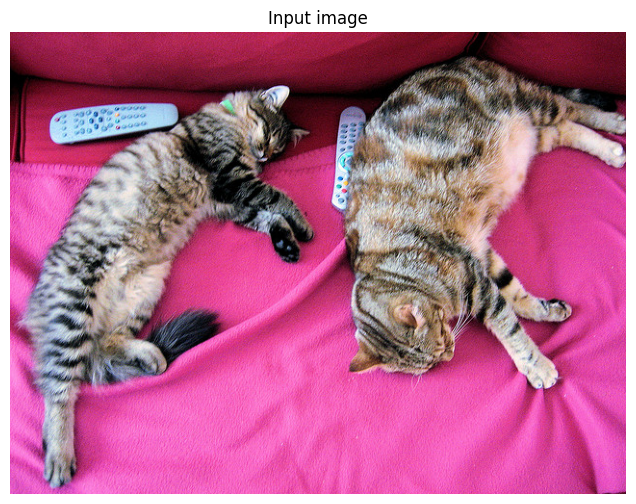
Model response
This image features two tabby cats lying on a bright pink surface, likely a blanket or soft fabric.
Here's a detailed description:
- Subjects: There are two cats. * The cat on the left is a striped tabby with dark and gray markings. It is lying down and appears relaxed. * The cat on the right is also a tabby, with warmer, brownish-orange tones. It is stretched out, with its head resting down, and appears to be grooming or resting.
- Setting/Background: The cats are resting on a vibrant, solid pink fabric. The background suggests an interior setting, possibly a bed or sofa.
- Objects: There are a few small objects visible near the left cat: * A white remote control (possibly for a TV or device) is lying on the pink fabric near the left cat. * A small, light-colored electronic device or remote is also visible near the right cat.
Overall Impression: The image has a warm, cozy, and domestic feel, highlighting the relaxed state of the two cats in a bright environment.
3. Object detection-style localization
Gemma 4 can localize objects by returning structured JSON alongside natural- language output. In practice, the model often produces a short explanation before the JSON payload, so it is useful to parse the fenced block explicitly.
In this section, the model identifies cats in the image, the JSON is extracted, the normalized 0-1000 coordinates are rescaled to image pixels, and the boxes are rendered with Keras visualization utilities.
PROMPT_DETECTION = (
    "<|turn>user\n"
    "<|image|>\n"
    "Identify every cat in this image. First give one short sentence, then\n"
    "return a JSON array inside a ```json``` block. Each item must contain\n"
    "<|turn>model\n"
)
detection_output = model.generate(
    {"prompts": [PROMPT_DETECTION], "images": [image]},
    max_length=2048,
)
raw_detection_text = strip_prompt(detection_output, PROMPT_DETECTION)
display_model_response(raw_detection_text)

parsed_detections = render_detection_result(image, raw_detection_text)
parsed_detections
Model response
[
  {"box_2d": [107, 13, 988, 496], "label": "cat"},
  {"box_2d": [45, 518, 772, 996], "label": "cat"}
]
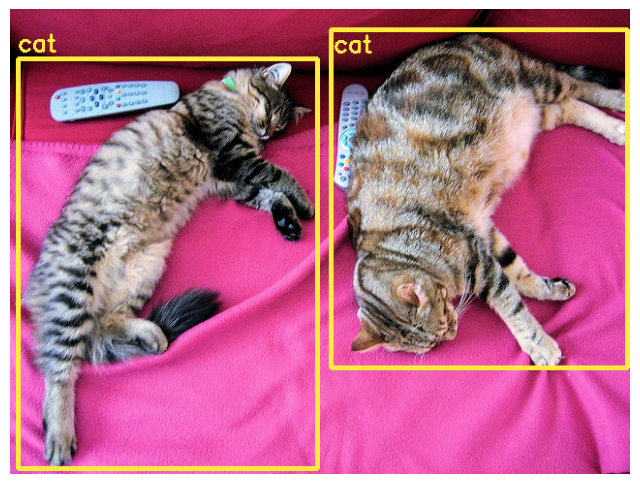
[{'box_2d': [107, 13, 988, 496], 'label': 'cat'},
 {'box_2d': [45, 518, 772, 996], 'label': 'cat'}]
4. Audio transcription
Audio input is available on the E2B and E4B Gemma 4 checkpoints. Video-style understanding is supported across the model family, but audio is limited to these smaller variants. The prompt below makes the task explicit and specifies the exact output formatting.
Note: Gemma 4 expects audio input to be sampled at 16kHz. In this guide, we
use a helper function load_audio (defined in the utilities section) to read
the audio file, downmix it to mono if necessary, and resample it to the desired
16kHz rate.
PROMPT_AUDIO = (
    "<|turn>user\n"
    "<|audio|>"
    "Transcribe the following speech segment in its original language. "
    "Follow these specific instructions for formatting the answer:\n"
    "* Only output the transcription, with no newlines.\n"
    "* When transcribing numbers, write the digits, i.e. write 1.7\n"
    " and not one point seven, and write 3 instead of three.<turn|>\n"
    "<|turn>model\n"
)

audio_path = "female_short_voice_clip_17sec.wav"
if not os.path.exists(audio_path):
    print("Downloading audio file...")
    response = requests.get(AUDIO_URL)
    with open(audio_path, "wb") as f:
        f.write(response.content)

audio = load_audio(audio_path)
print("Audio shape:", audio.shape, "dtype:", audio.dtype)
audio_output = model.generate(
    {"prompts": [PROMPT_AUDIO], "audio": [audio]},
    max_length=2048,
)
display_model_response(strip_prompt(audio_output, PROMPT_AUDIO))
Downloading audio file...
Audio shape: (282958,) dtype: float32
Model response
Intelligence is a multifaceted ability encompassing reasoning, learning, problem-solving, abstraction, creativity, and adaptation, allowing organisms or systems to process information, recognize patterns, form connections, and navigate complex environments efficiently.
5. Function calling
Gemma 4 supports native function calling for tool-augmented workflows. The basic pattern is consistent across applications: declare the tool, let the model emit a tool call, execute the tool externally, append the tool response, and then continue generation.
PROMPT_FUNC_CALL = (
    "<|turn>system\n"
    "You are a helpful assistant."
    "<|tool>declaration:get_current_weather{"
    'description:<|"|>Returns the current weather for a given city.,'
    "parameters:{"
    'location:{type:<|"|>string<|"|>,description:<|"|>The city name<|"|>}'
    "}}"
    "<tool|><turn|>\n"
    "<|turn>user\n"
    "What is the weather like in Paris right now?<turn|>\n"
    "<|turn>model\n"
)

tool_call_output = model.generate({"prompts": [PROMPT_FUNC_CALL]}, max_length=256)
tool_call_text = (
    tool_call_output[0] if isinstance(tool_call_output, list) else tool_call_output
)
tool_call_text = tool_call_text.split("<|turn>model\n")[-1]
print(tool_call_text)

PROMPT_WITH_RESPONSE = (
    PROMPT_FUNC_CALL
    + '<|tool_call>call:get_current_weather{location:<|"|>Paris<|"|>}'
    + "<tool_call|><|tool_response>response:get_current_weather{"
    + 'temperature:18,weather:<|"|>partly cloudy<|"|>}<tool_response|>\n'
    + "<|turn>model\n"
)

final_weather_output = model.generate(
    {"prompts": [PROMPT_WITH_RESPONSE]}, max_length=256
)
final_weather_text = (
    final_weather_output[0]
    if isinstance(final_weather_output, list)
    else final_weather_output
)
final_weather_text = final_weather_text.split("<|turn>model\n")[-1]
display_model_response(final_weather_text)
<|tool_call>call:get_current_weather{location:<|"|>Paris<|"|>}<tool_call|><|tool_response>
Model response
The weather in Paris right now is partly cloudy with a temperature of 18 degrees.
6. Coding
Gemma 4 is also a strong coding model. You can use the same causal language model interface for code generation, refactoring, explanation, and small utility synthesis tasks.
PROMPT_CODE = (
    "<|turn>user\n"
    "Write a Python function named `is_palindrome` that ignores\n"
    "punctuation, whitespace, and letter casing. Also include a few\n"
    "short test calls.<turn|>\n"
    "<|turn>model\n"
)

code_output = model.generate({"prompts": [PROMPT_CODE]}, max_length=512)
display_model_response(strip_prompt(code_output, PROMPT_CODE))
Model response
import re

def is_palindrome(text):
    """
    Checks if a given string is a palindrome, ignoring punctuation,
    whitespace, and letter casing.

    Args:
        text (str): The input string to check.

    Returns:
        bool: True if the string is a palindrome, False otherwise.
    """
    # 1. Convert to lowercase
    text = text.lower()

    # 2. Remove all non-alphanumeric characters (punctuation and whitespace)
    # re.sub(pattern, replacement, string) replaces all matches of the pattern
    cleaned_text = re.sub(r'[^a-z0-9]', '', text)

    # 3. Check if the cleaned string is equal to its reverse
    return cleaned_text == cleaned_text[::-1]

# --- Test Calls ---

print("--- Testing is_palindrome function ---")

# Test Case 1: Simple palindrome (should be True)
test1 = "Racecar"
result1 = is_palindrome(test1)
print(f"'{test1}' is a palindrome: {result1}")  # Expected: True

# Test Case 2: Palindrome with mixed case and spaces (should be True)
test2 = "A man a plan a canal Panama"
result2 = is_palindrome(test2)
print(f"'{test2}' is a palindrome: {result2}")  # Expected: True

# Test Case 3: Not a palindrome (should be False)
test3 = "hello world"
result3 = is_palindrome(test3)
print(f"'{test3}' is a palindrome: {result3}")  # Expected: False

# Test Case 4: Palindrome with punctuation and numbers (should be True)
test4 = "Madam, I'm Adam"
result4 = is_palindrome(test4)
print(f"'{test4}' is a palindrome: {result4}")  # Expected: True (madamimadam)

# Test Case 5: Empty string (should be True, as an empty string is a palindrome)
7. HTML generation and rendering
Gemma 4 can generate structured code like HTML. In a notebook environment like
Colab, we can use Python's IPython.display.HTML to render the generated HTML
directly, providing a visual verification of the model's output.
PROMPT_HTML = (
    "<|turn>user\n"
    "Create a stunning, interactive Glassmorphic product card in HTML and\n"
    "inline CSS. It should have a dark background for the page, a\n"
    "frosted-glass effect on the card (backdrop-filter: blur), a glowing\n"
    "and a glowing 'Buy Now' button. "
    "Make it look like a premium UI component. "
    "Return ONLY the HTML code inside a ```html block.<turn|>\n"
    "<|turn>model\n"
)

html_output = model.generate({"prompts": [PROMPT_HTML]}, max_length=2048)
html_text = strip_prompt(html_output, PROMPT_HTML)

# Extract HTML from the code block
match = re.search(r"```html\s*(.*?)\s*```", html_text, flags=re.DOTALL)
if match:
    extracted_html = match.group(1)
    display_model_response(
        extracted_html,
        title="Generated HTML from the model",
        language="html",
    )
else:
    print("\nCould not find HTML block to render.")
Model response
<!DOCTYPE html>
<html lang="en">
<head>
    <meta charset="UTF-8">
    <meta name="viewport" content="width=device-width, initial-scale=1.0">
    <title>Glassmorphic Product Card</title>
    <style>
        body {
            background: linear-gradient(135deg, #1a0033 0%, #000000 100%);
            display: flex;
            justify-content: center;
            align-items: center;
            min-height: 100vh;
            margin: 0;
            font-family: 'Segoe UI', Tahoma, Geneva, Verdana, sans-serif;
        }

        .glass-card {
            width: 350px;
            padding: 30px;
            border-radius: 20px;
            box-shadow: 0 8px 32px 0 rgba(31, 38, 135, 0.37);
            background: rgba(255, 255, 255, 0.15); /* Light background for glass effect */
            backdrop-filter: blur(10px); /* The frosted glass effect */
            -webkit-backdrop-filter: blur(10px); /* Safari support */
            border: 1px solid rgba(255, 255, 255, 0.18); /* Subtle border for definition */
            color: #e0e0ff;
            transition: transform 0.3s ease, box-shadow 0.3s ease;
            display: flex;
            flex-direction: column;
            align-items: center;
            text-align: center;
        }

        .glass-card:hover {
            transform: translateY(-10px);
            box-shadow: 0 15px 40px 0 rgba(100, 149, 237, 0.5); /* Enhanced glow on hover */
        }

        .product-image {
            width: 100%;
            height: 200px;
            background: rgba(255, 255, 255, 0.2);
            border-radius: 15px;
            margin-bottom: 20px;
            display: flex;
            justify-content: center;
            align-items: center;
            font-size: 1.2em;
            color: rgba(255, 255, 255, 0.7);
            border: 1px solid rgba(255, 255, 255, 0.2);
        }

        h1 {
            font-size: 1.8em;
            margin-bottom: 10px;
            color: #ffffff;
            text-shadow: 0 0 10px rgba(100, 149, 237, 0.8);
        }

        p {
            font-size: 1em;
            margin-bottom: 25px;
            color: rgba(220, 220, 255, 0.8);
        }

        .buy-button {
            padding: 12px 30px;
            font-size: 1.1em;
            font-weight: bold;
            color: #ffffff;
            background: linear-gradient(45deg, #6a11cb 0%, #2575fc 100%);
            border: none;
            border-radius: 50px;
            cursor: pointer;
            transition: all 0.3s ease;
            text-transform: uppercase;
            letter-spacing: 1px;
            box-shadow: 0 0 15px rgba(106, 17, 203, 0.7); /* Initial glow */
            position: relative;
            overflow: hidden;
        }

        .buy-button:hover {
            transform: scale(1.05);
            box-shadow: 0 0 25px rgba(106, 17, 203, 1), 0 0 40px rgba(37, 117, 252, 0.8); /* Intense glow on hover */
        }

        /* Optional: Add a subtle animation for the button glow */
        .buy-button::before {
            content: '';
            position: absolute;
            top: 50%;
            left: 50%;
            width: 0;
            height: 0;
            background: radial-gradient(circle, rgba(255, 255, 255, 0.8) 0%, transparent 70%);
            transform: translate(-50%, -50%);
            transition: width 0.5s ease, height 0.5s ease;
            opacity: 0;
        }

        .buy-button:hover::before {
            width: 300%;
            height: 300%;
            opacity: 0.5;
        }
    </style>
</head>
<body>

    <div class="glass-card">
        <div class="product-image">
            [Product Image Placeholder]
        </div>
        <h1>Stellar Widget Pro</h1>
        <p>Experience the next generation of performance with our cutting-edge technology. Limited stock available!</p>
        <button class="buy-button">Buy Now</button>
    </div>

</body>
</html>
8. Thinking mode and Agentic Workflows
Thinking mode is controlled from the system prompt. Gemma 4 can emit a thought channel before a tool call or before the final answer.
In this section, we demonstrate a small automated agentic workflow for a Smart Home Assistant. We define local Python functions as tools, and write a simple loop to automate the process: the model decides to call a tool, we execute it, and feed the result back to the model until it completes the task.
# Mock tools
def control_device(room, device, action):
    return f"Success: {device} in {room} is now {action}."


def read_sensor(room, sensor_type):
    if sensor_type == "temperature":
        return "22°C"
    elif sensor_type == "humidity":
        return "45%"
    return "Unknown sensor"


tools = {"control_device": control_device, "read_sensor": read_sensor}

PROMPT_AGENT = (
    "<|turn>system\n"
    "<|think|>You are a helpful smart home assistant."
    "<|tool>declaration:control_device{"
    "description:<|\"|>Control a smart home device.<|\"|>,"
    "parameters:{"
    "room:{type:<|\"|>string<|\"|>,description:<|\"|>The room name<|\"|>},"
    "device:{type:<|\"|>string<|\"|>,description:<|\"|>The device name (e.g., lights, fan)<|\"|>},"
    "action:{type:<|\"|>string<|\"|>,description:<|\"|>The action (on, off)<|\"|>}"
    "}}"
    "<|tool>declaration:read_sensor{"
    "description:<|\"|>Read a sensor value.<|\"|>,"
    "parameters:{"
    "room:{type:<|\"|>string<|\"|>,description:<|\"|>The room name<|\"|>},"
    "sensor_type:{type:<|\"|>string<|\"|>,description:<|\"|>The sensor type (temperature, humidity)<|\"|>}"
    "}}"
    "<tool|><turn|>\n"
    "<|turn>user\n"
    "Turn off the kitchen lights by setting action='off' and check the\n"
    "temperature in the bedroom by setting sensor_type='temperature'.<turn|>\n"
    "<|turn>model\n"
)


def run_agent_loop(prompt):
    conversation = prompt
    max_turns = 5

    for turn in range(max_turns):
        print(f"\n--- Agent Turn {turn + 1} ---")
        output = model.generate({"prompts": [conversation]}, max_length=1024)
        generated_text = strip_prompt(output, conversation)
        if not generated_text:
            print("\nAgent finished or no output.")
            break

        display_model_response(generated_text, title=f"Model response, turn {turn + 1}")

        # Check for tool calls
        matches = re.findall(
            r"<\|tool_call>(.*?)<tool_call\|>", generated_text, flags=re.DOTALL
        )
        if matches:
            conversation += generated_text
            for call_str in matches:
                call_match = re.search(r"call:(\w+)\{(.*?)\}", call_str)
                if call_match:
                    tool_name = call_match.group(1)
                    args_str = call_match.group(2)
                    args = {}
                    for pair in args_str.split(","):
                        join_pair = pair.split(":")
                        if len(join_pair) == 2:
                            val = join_pair[1].strip()
                            val = val.replace('<|"|>', "").replace(
                                "<||>", ""
                            )
                            args[join_pair[0].strip()] = val

                    print(f"\nExecuting tool: {tool_name} with args {args}")
                    if tool_name in tools:
                        result = tools[tool_name](**args)
                        print(f"Tool Result: {result}")
                        conversation += f"<|tool_response>response:{tool_name}{{{result}}}<tool_response|>\n"
                    else:
                        print(f"Error: Tool {tool_name} not found.")
                        break
                else:
                    print("Error: Malformed tool call.")
                    break
            conversation += "<|turn>model\n"
        else:
            print("\nAgent finished or no tool call.")
            break


run_agent_loop(PROMPT_AGENT)
--- Agent Turn 1 ---
Model response, turn 1
<|channel>thought 1. Analyze the user request: The user has two distinct requests: * "Turn off the kitchen lights by setting action='off'". * "check the temperature in the bedroom by setting sensor_type='temperature'".
-
Identify necessary tools: * To turn off lights, the
control_devicetool is relevant. * To check the temperature, theread_sensortool is relevant. -
Process the first request ("Turn off the kitchen lights"): * Tool:
control_device*device: "lights" (implied by "kitchen lights") *room: "kitchen" *action: "off" * Construct the tool call:control_device(room='kitchen', device='lights', action='off') -
Process the second request ("check the temperature in the bedroom"): * Tool:
read_sensor*sensor_type: "temperature" *room: "bedroom" * Construct the tool call:read_sensor(room='bedroom', sensor_type='temperature') -
Combine the tool calls: Since both actions can be performed independently, they should be called sequentially in the response.
-
Final Output Generation: Format the identified tool calls into the required JSON structure.<|tool_call>call:control_device{room:<|"|>kitchen<|"|>,device:<|"|>lights<|"|>,action:<|"|>off<|"|>}
Executing tool: control_device with args {'room': 'kitchen', 'device': 'lights', 'action': 'off'} Tool Result: Success: lights in kitchen is now off.
Executing tool: read_sensor with args {'room': 'bedroom', 'sensor_type': 'temperature'} Tool Result: 22°C
— Agent Turn 2 —
Model response, turn 2
The kitchen lights have been turned off, and the temperature in the bedroom is 22°C.
Agent finished or no tool call.
Reasoning-only thinking example
Thinking mode is not limited to tool use. It can also be used for complex reasoning tasks, such as solving math problems step-by-step.
PROMPT_THINKING = (
    "<|turn>system\n"
    "<|think|>You are a helpful math tutor.<turn|>\n"
    "<|turn>user\n"
    "A train travels 120 km in 1.5 hours. How long\n"
    "will it take to travel 200 km at the same speed?<turn|>\n"
    "<|turn>model\n"
)

thinking_output = model.generate({"prompts": [PROMPT_THINKING]}, max_length=512)
thinking_text = (
    thinking_output[0] if isinstance(thinking_output, list) else thinking_output
)
thinking_text = thinking_text.split("<|turn>model\n")[-1]
display_model_response(thinking_text)
Model response
Here's a thinking process to solve this problem:
-
Understand the Goal: The request asks for the time it takes to travel 200 km, given that the train travels 120 km in 1.5 hours, and the speed remains constant.
-
Identify the Key Information (Initial Data): * Distance 1 (\(D_1\)): 120 km * Time 1 (\(T_1\)): 1.5 hours * Target Distance (\(D_2\)): 200 km * Goal: Find Time 2 (\(T_2\)).
-
Determine the Speed (The Constant Factor): Since the speed is the same for both trips, I must calculate the speed first. * Formula for Speed (\(S\)): \(S = \text{Distance} / \text{Time}\) * Calculate \(S\): \(S = 120 \text{ km} / 1.5 \text{ hours}\) * Calculation: \(120 / 1.5\). (Tip: \(1.5 = 3/2\). So, \(120 / (3/2) = 120 \times (2/3) = 240 / 3 = 80\)). * Speed (\(S\)): 80 km/h.
-
Calculate the Time for the New Distance: Now use the calculated speed and the new distance to find the new time. * Formula for Time (\(T\)): \(T = \text{Distance} / \text{Speed}\) * \(D_2 = 200\) km * \(S = 80\) km/h * Calculate \(T_2\): \(T_2 = 200 \text{ km} / 80 \text{ km/h}\) * Calculation: $200 / 80 = 20 / 8 = 10 / 4
9. Multi-image comparison
Gemma 4 can compare multiple images within a single turn. This is useful for comparing similar objects in different scenes or finding differences.
In this section, we use two images of zebras in different environments (lush jungle vs. dry enclosure) and ask the model to describe the scenes and interactions.
ZEBRA_URL_1 = "http://images.cocodataset.org/val2017/000000113354.jpg"
ZEBRA_URL_2 = "http://images.cocodataset.org/val2017/000000104455.jpg"

image_1 = load_image(ZEBRA_URL_1)
image_2 = load_image(ZEBRA_URL_2)
display_images([image_1, image_2], titles=["Zebra Scene 1", "Zebra Scene 2"])

PROMPT_COMPARE = (
    "<|turn>user\n"
    "<|image|>\n"
    "<|image|>\n"
    "These images show the same type of animal in different environments.\n"
    "Describe the differences in the scenes and how the animals appear\n"
    "to be interacting with their surroundings.<turn|>\n"
    "<|turn>model\n"
)

comparison_output = model.generate(
    {"prompts": [PROMPT_COMPARE], "images": [[np.array(image_1), np.array(image_2)]]},
    max_length=2048,
)
display_model_response(strip_prompt(comparison_output, PROMPT_COMPARE))
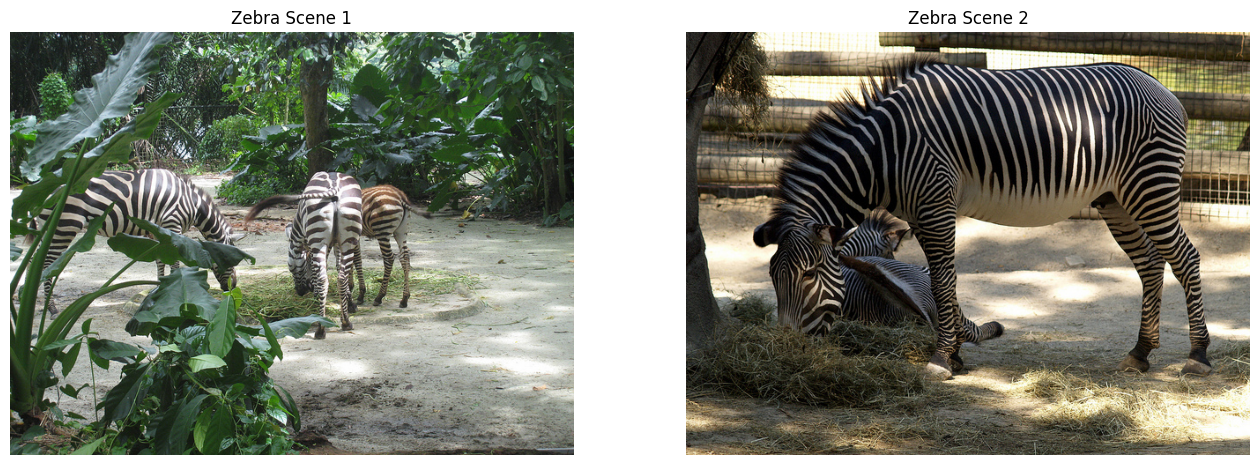
Model response
The two images depict zebras in different settings, showcasing variations in the environment and the animals' behavior.
Image 1 Analysis: * Setting: This scene appears to be in a more natural or semi-natural, lush, and shaded environment. There is dense green foliage, large leaves in the foreground, and trees in the background, suggesting a jungle or woodland setting. The ground is dirt/sand mixed with some sparse grass. * Animals: There are at least three zebras visible. Two are standing in the middle ground, and one is partially visible on the left. They appear to be standing relatively calmly, perhaps grazing or observing their surroundings. * Interaction: The zebras seem to be existing within this dense vegetation. The overall mood is one of quiet coexistence within a natural habitat.
Image 2 Analysis: * Setting: This scene is clearly an enclosure, likely a zoo or wildlife park. There is a visible wire or mesh fence in the background, and the ground is dry, sandy earth with patches of dry grass. The lighting suggests bright, open sunlight. * Animals: There are several zebras visible. The most prominent zebra in the foreground is standing and facing toward the viewer, showcasing its distinct black and white stripes clearly. Other zebras are visible in the background, some of which appear to be lying down or resting on hay/straw. * Interaction: The animals in this scene appear to be interacting with the enclosure environment. Some are resting or feeding on provided material (hay), while the zebra in the foreground is alert and facing outward. The interaction is framed by the boundaries of the enclosure.
Key Differences:
- Environment: Image 1 is characterized by dense, lush, natural vegetation and shade, whereas Image 2 is an open, dry enclosure with visible fencing.
- Lighting and Atmosphere: Image 1 has a softer, shaded atmosphere, while Image 2 is brightly lit by direct sunlight.
- Animal Activity/Focus: In Image 1, the animals seem integrated into the dense foliage. In Image 2, the animals are situated within a defined boundary, and some are actively resting on provided bedding (hay).
In summary, the first image portrays zebras in a more wild, shaded habitat, while the second image shows them in a managed, open enclosure setting.
10. Video prompting
Gemma 4 supports native video understanding. In KerasHub, you can pass a video
as a sequence of frames directly to the model using the videos argument in the
input dictionary, and use the <|video|> token in the prompt to indicate where
the video content belongs.
Note: Video prompts involve processing many frames, which can result in very
long sequences. Make sure to increase max_length appropriately when generating
responses for video inputs.
VIDEO_URL = (
    "https://test-videos.co.uk/vids/bigbuckbunny/mp4/h264/360/"
    "Big_Buck_Bunny_360_10s_1MB.mp4"
)

# Download and decode video
print("Downloading test video...")
response = requests.get(VIDEO_URL, timeout=60)
response.raise_for_status()
container = av.open(BytesIO(response.content))
frames = [f.to_ndarray(format="rgb24") for f in container.decode(video=0)]
video_frames = np.stack(frames)  # Shape: (T, H, W, C)

print(f"Decoded {video_frames.shape[0]} frames.")

num_frames = 32
T = video_frames.shape[0]
indices = np.arange(0, T, T / num_frames).astype(int)[:num_frames]
video_frames_sub = video_frames[indices]

print(f"Subsampled to {video_frames_sub.shape[0]} frames.")

PROMPT_VIDEO = "<|turn>user\n" "<|video|>Describe this video.<turn|>\n" "<|turn>model\n"

# Gemma4CausalLM expects batched inputs, so we add a batch dimension to video
video_output = model.generate(
    {"prompts": [PROMPT_VIDEO], "videos": [video_frames_sub]},
    max_length=4096,
)

display_model_response(strip_prompt(video_output, PROMPT_VIDEO))
Downloading test video...
Decoded 300 frames.
Subsampled to 32 frames.
Model response
This appears to be a still image or a sequence of stills from a 3D animation or video game scene, depicting a magical or naturalistic outdoor setting.
Here's a detailed description of what is visible in the images:
Setting: * Lush, Vibrant Nature: The scene is dominated by incredibly vibrant, bright green grass that looks very healthy and well-lit. * Forest/Jungle Environment: The background is dense with tall trees and foliage, suggesting a deep forest, jungle, or a very lush garden. The lighting suggests it might be daytime, with dappled sunlight filtering through the leaves. * Atmosphere: The overall mood is serene, magical, and overgrown.
Central Feature: * Fairy Ring/Mound: The focal point is a large, moss-covered mound or hill. * Tree Trunk Base: A large, gnarled tree trunk appears to be growing out of the center of this mound, with its roots forming the base of the structure. * Cave/Opening: There is a dark, arched opening or cave entrance visible in the center of the mound, suggesting a hidden space or entrance to something mysterious. * Stones: Several large, rounded rocks are scattered around the base of the mound.
Overall Impression: The image evokes a sense of fantasy, nature magic, or a hidden sanctuary within a vibrant, overgrown wilderness. It looks like a scene from a fantasy adventure game, a nature-themed cinematic, or a stylized digital artwork.
11. OCR, translation & entity extraction
Gemma 4 is strong on OCR and document understanding. For document-heavy tasks, the prompting pattern stays simple: pass the image, ask for exact extraction, and make the expected output format explicit.
In this section, we use an image of German street signs. We ask the model to transcribe the German text (OCR), identify the location names (entities), and provide their English translation.
OCR_IMAGE_URL = "http://images.cocodataset.org/val2017/000000011615.jpg"
ocr_image = load_image(OCR_IMAGE_URL)
display_images(ocr_image, titles=["OCR input"])

PROMPT_OCR = (
    "<|turn>user\n"
    "<|image|>\n"
    "Extract the text from this image. First, transcribe all text in its\n"
    "original language (German). Then, identify the entities (place names\n"
    "like 'Severins-brücke') and provide their English translation.\n"
    "Format the output clearly.<turn|>\n"
    "<|turn>model\n"
)

ocr_output = model.generate(
    {"prompts": [PROMPT_OCR], "images": [ocr_image]},
    max_length=2048,
)
display_model_response(strip_prompt(ocr_output, PROMPT_OCR))
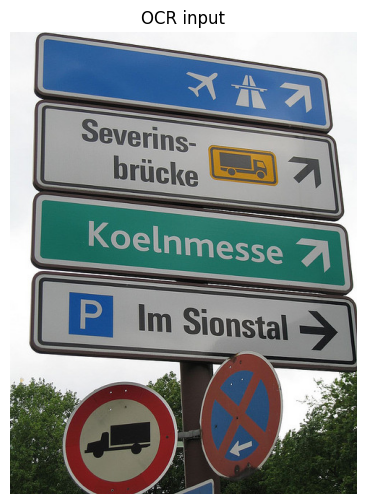
Model response
Here is the extracted text, entity identification, and translation:
Extracted Text (German)
- Severins-brücke
- Koelnmesse
- Im Sionstal
Entities and English Translations
| German Entity | English Translation | Type |
|---|---|---|
| Severins-brücke | Severin Bridge | Place Name |
| Koelnmesse | Cologne Exhibition Centre (or Koelnmesse) | Place Name/Venue |
| Im Sionstal | In the Sion Valley | Place Name |
12. Travel planning from location
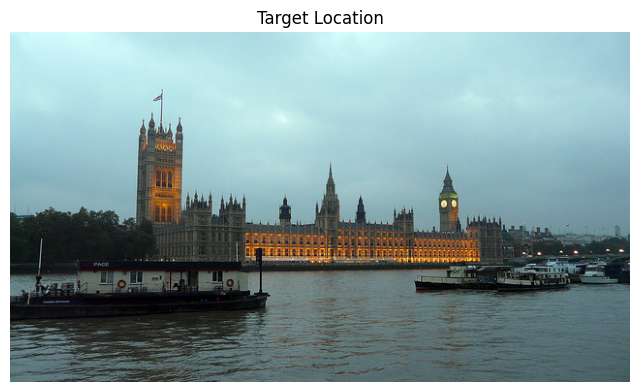
Gemma 4's multimodal capabilities allow it to recognize famous landmarks and provide contextual information, such as creating travel plans based on the location shown in an image.
LOCATION_URL = "http://images.cocodataset.org/val2017/000000036678.jpg"
location_image = load_image(LOCATION_URL)
display_images(location_image, titles=["Target Location"])

PROMPT_TRAVEL = (
    "<|turn>user\n"
    "<|image|>\n"
    "Identify the location in this image and create a 3-day travel plan\n"
    "for it. Include top attractions and a few restaurant suggestions.\n"
    "Format the output clearly with headings.<turn|>\n"
    "<|turn>model\n"
)

travel_output = model.generate(
    {"prompts": [PROMPT_TRAVEL], "images": [location_image]},
    max_length=2048,
)
display_model_response(strip_prompt(travel_output, PROMPT_TRAVEL))
Model response
Location Identification
The image displays the Palace of Westminster (including the Houses of Parliament) and the Elizabeth Tower (housing Big Ben) on the River Thames in London, United Kingdom.
3-Day London Travel Plan
This itinerary balances iconic historical sightseeing, cultural experiences, and London's vibrant atmosphere.
Day 1: Royal & Political History
Theme: Iconic Landmarks and Westminster History
- Morning (9:00 AM - 1:00 PM): Westminster Abbey. Start your day at this magnificent Gothic church, the site of coronations, royal weddings, and burials. (Book tickets in advance).
- Lunch (1:00 PM - 2:00 PM): Grab a traditional pub lunch near Westminster, perhaps in the area around Whitehall.
- Afternoon (2:00 PM - 5:00 PM): Houses of Parliament & Big Ben. Take photos of the Palace of Westminster and the iconic clock tower. Walk along the South Bank to see the bridges.
- Late Afternoon (5:00 PM - 7:00 PM): Walk along the South Bank. Enjoy the atmosphere, watch street performers, and see the London Eye from a distance.
- Evening: Dinner in Covent Garden. Explore the lively market area for diverse dining options and street entertainment.
🍽️ Restaurant Suggestions for Day 1: * The Red Lion (Near Westminster): For classic, traditional British pub fare. * Borough Market (Lunch/Early Dinner): Excellent for sampling various street foods and artisanal products.
Day 2: Royal Grandeur & Museum Culture
Theme: Royal Parks, Art, and Culture
- Morning (9:30 AM - 1:00 PM): Buckingham Palace & St. James's Park. Visit the official residence of the monarch (check for changing of the guard times). Afterwards, relax and stroll through the beautiful St. James's Park.
- Lunch (1:00 PM - 2:00 PM): Casual lunch near Trafalgar Square.
- Afternoon (2:00 PM - 5:00 PM): National Gallery (Trafalgar Square). Immerse yourself in world-class art collections, featuring masterpieces by Van Gogh, Da Vinci, and more.
- Late Afternoon (5:00 PM - 7:00 PM): Trafalgar Square & Nelson's Column. Enjoy the central hub of London.
- Evening: Dinner in Soho. Explore this vibrant, eclectic neighborhood known for its diverse international cuisine and nightlife.
🍽️ Restaurant Suggestions for Day 2: * The Ivy Market Grill (Covent Garden/Soho area): Upscale, classic British dining experience. * Dishoom (Various locations, try Shoreditch or Covent Garden): Famous for delicious, flavorful Bombay Café style food.
Day 3: History, Markets, and River Life
Theme: History, Markets, and Thames Experience
- Morning (9:30 AM - 1:00 PM): Tower of London. Explore this historic castle, home to the Crown Jewels, and learn about its centuries of royal and dark history. (Allow at least 3 hours).
- Lunch (1:00 PM - 2:00 PM): Lunch near the Tower or Borough Market area.
- Afternoon (2:00 PM - 5:00 PM): Borough Market Exploration & South Bank Walk. Spend time browsing the incredible food stalls at Borough Market, followed by a relaxed walk along the South Bank, perhaps visiting the Tate Modern if time permits.
- Late Afternoon (5:00 PM - 7:00 PM): River Cruise on the Thames. Take a scenic boat tour to see the city skyline from a different perspective.
- Evening: Farewell Dinner in a Historic Area. Choose a neighborhood like the City of London or a quieter area in West End for a final memorable meal.
🍽️ Restaurant Suggestions for Day 3: * Padella (Borough Market): Excellent, high-quality pasta dishes. * The Wolseley (Piccadilly): For a truly grand, classic, and elegant final dinner experience.
Essential London Travel Tips
- Transportation: Utilize the Tube (Underground) for fast travel between major zones. Purchase an Oyster Card or use a contactless payment card for easy travel.
- Booking: Pre-book tickets for the Tower of London, Westminster Abbey, and the London Eye to save time.
- Weather: London weather is unpredictable. Always carry layers and a waterproof jacket, even on sunny days.
- Pace: This is a busy city. Be prepared for crowds, especially around major landmarks.
Closing notes
This guide stays close to the low-level Gemma4CausalLM.generate() API on
purpose. It makes the prompt format explicit, shows how to pass images and
audio, and demonstrates how to post-process structured output for downstream
visualization.
The above examples demonstrate the high-level usage and capability of this model. You can explore and perform tasks for many different use cases and experiment with complex reasoning, agentic workflows, and multimodal understanding.
Note: This model is trained with 140+ languages and it works well with Text translation, speech translation, Image Translation and other such tasks.
For production usage, the main things to harden are authentication, response validation, retry handling, and guardrails around tool execution and OCR or detection post-processing.
Further Reading
- For LoRA and QLoRA fine-tuning of Gemma, refer to the Parameter-efficient fine-tuning of Gemma with LoRA and QLoRA example.
- For quantization, refer to the INT8 quantization in Keras guide.